Choosing how far ahead the absence cards look
The Team absences and Department absences cards on your dashboard show two weeks by default. You can change that to suit how far ahead you plan, and your choice affects only your own dashboard.
Changing it
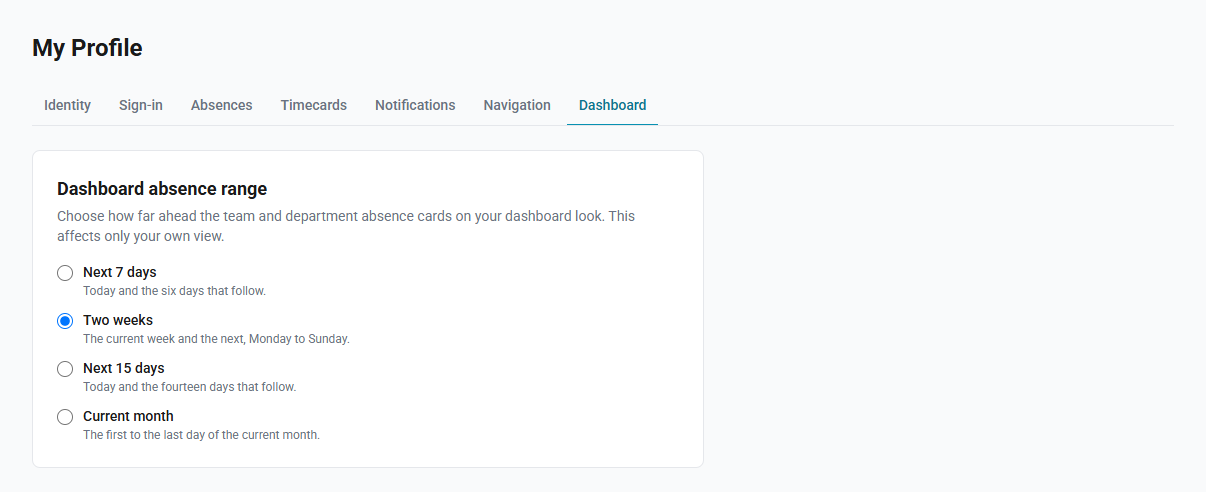
The range is one of four, and it applies to both cards.
How to change the range
- Select your name at the foot of the sidebar to open My Profile.
- Select the Dashboard tab.
- Choose a range. It is saved as soon as you select it.
| Range | What the columns cover |
|---|---|
| Next 7 days | Today and the six days that follow. |
| Two weeks | The current week and the next, Monday to Sunday. |
| Next 15 days | Today and the fourteen days that follow. |
| Current month | The first to the last day of the current month. |
Reading the period
Each card names the period it is covering, under the card's title. The wording follows the range you picked, because the four ranges are not described the same way:
| Range | Reads as |
|---|---|
| Next 7 days | Aug 18 – 24, 2026 |
| Two weeks | Weeks 34–35 · August 2026 |
| Next 15 days | Aug 18 – Sep 1, 2026 |
| Current month | August 2026 |
Week numbers appear only for Two weeks, which is the one range that starts on a Monday and covers whole weeks. The two rolling ranges start today, so they begin mid-week and end mid-week; a week number against those would suggest an alignment they do not have, and a date range says it plainly instead.
Where a range crosses into the next month or year, both are named — so a
fortnight running from late December reads Weeks 53 & 1 · December 2026 – January 2027.
Which range to choose
The four options fall into two groups, and the difference matters more than the number of days.
Two weeks and Current month are aligned to the calendar. They begin at the start of the current week or month, so the columns line up with the week and month you already have in mind — and they therefore include days that have already passed. On a Thursday, the two-week range begins on the Monday just gone, with today's column highlighted three places in.
Next 7 days and Next 15 days roll forward from today, so the first column is always today and nothing behind you is shown. Choose one of these if you only want what is still ahead.
Reading a wider card
Everything else about the cards is unchanged: a row per colleague with at least one absence in the range, a solid block for an approved absence and a dashed outline for one still pending, and today's column highlighted.
Two things help at the wider ranges:
- A small gap after each Sunday separates one week from the next.
- If the range is wider than the card, the grid scrolls sideways while the names stay in place. The whole card is still a link to the full calendar.
The current month is the widest range and can reach 31 columns, so the cells are drawn smaller there than at seven days. The full calendar remains one click away for a month you want to read in detail.
Related
- Department absences on the dashboard — what the cards show and who sees them
- Department absence calendar — the full month view the cards link to