Master data
Master data is the reference information that work is recorded against: the business partners work is done for, the items it is booked under, the objects and tasks it belongs to, and the currencies and departments used throughout ChronoHub. It is kept under Master Data, and can be entered by hand or imported from SAP Business One or SAP FSM.
This page covers the lists that share one way of working: Business Partners, Items, Parent Objects, Tasks, Currencies and Departments. Employees, Schedule Templates and Bank Holidays have pages of their own: Employees, Schedules and Public holidays.
Who may do what
| Role | What they can do |
|---|---|
| Administrator | Everything, including importing |
| Manager | Create, edit and delete records in every list. No importing |
| HR | View the Departments list. The other lists are not available |
| Employee | No access to these lists. The forms for efforts, materials and expenses still let them choose business partners, items and tasks |
The lists and their fields
| List | Fields | Used for |
|---|---|---|
| Business Partners | Code, Name | The customers that efforts, materials and expenses are recorded for |
| Items | Code, Description, Chargeable | What efforts, materials and expenses are booked under |
| Parent Objects | Type ID, Type Name, Object Key, Description, Date, Business Partner | The objects in the source system that work belongs to, such as service calls, each belonging to one business partner. Today fills in the date |
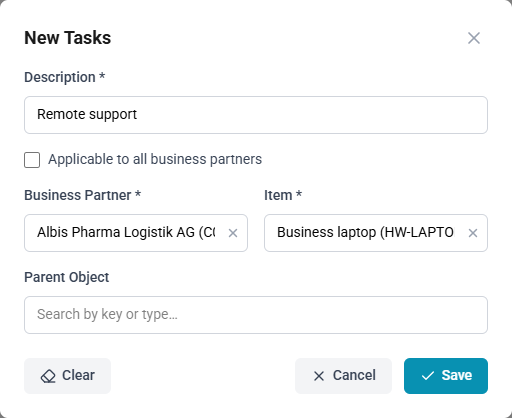
| Tasks | Description, Applicable to all business partners, Business Partner, Item, Parent Object | Predefined pieces of work. Choosing a task on an effort fills in its item, its parent object and, if empty, the description |
| Currencies | Code (three letters), Name | The currencies expenses are recorded in |
| Departments | Code, Name | The departments employees belong to |
Fields marked with an asterisk on the form are required. Each list shows records either as cards or as a table; the View control above the list chooses Auto (cards on narrow screens, a table on wider ones), Cards or Table. The choice applies to every list and is remembered in this browser.
Tasks
The Tasks list has two tabs, each with the number of tasks on it:
- Business Partner Tasks: tasks that belong to one business partner. In the table they are grouped under their business partner.
- Generic: tasks offered for every business partner.
A task is generic when Applicable to all business partners is ticked; it then has no business partner and no parent object. Otherwise a business partner is required, and a Parent Object can be chosen once the business partner is. In the table, selecting a task's business partner, item or parent object opens that record.
Finding records
Business Partners, Items, Parent Objects and Tasks offer three filters above the list:
- A search field: by name or code, by description or code, by object key or type, or by description, depending on the list.
- Source: the source system the records were imported from.
- Imported: Imported records, Local records entered in ChronoHub, or All.
Select Apply, or press Enter in the search field. The filters are remembered while the browser tab stays open.
Entering a record
How to add a record
- Open the list under Master Data.
- Select New.
- Enter the fields.
- Select Save.
While a new record is being entered, ChronoHub keeps what has been typed as a draft in this browser tab. If the page is reloaded or left before saving, New opens on the draft again. Cancel drops the draft. Clear empties the form and the draft, after a confirmation. Closing the form by selecting outside it, with changes not yet saved, asks whether to discard them.
Imported records
A record imported from a source system shows an Imported badge and its Source. It opens with View rather than Edit, read-only, with the notice This record was imported and cannot be edited. It is changed in the source system, and the next import brings the change across.
An imported business partner, item, parent object or task can still be deleted. The confirmation explains that this removes it from ChronoHub only: the record remains in the source system, and the next import may bring it back. Imported departments and currencies cannot be deleted.
A record still in use, such as a business partner with efforts recorded for it, cannot be deleted. ChronoHub says that it is referenced from another location.
Records are imported from the source system under Integrations, where a source's Import brings in business partners, items, parent objects, tasks and departments together. Currencies are not imported. See Importing master data.