Understanding the hours on an absence request
When you fill in an absence request, the form shows what it will cost you before you submit. That figure is not the number of days between your two dates — it is the hours your schedule says you would have worked on them.
What the preview tells you
Alongside the projected hours you will see the number of working days they came from, and a list of any days in the range that were not counted.
A Friday-to-Monday request for somebody working Monday to Friday reads as two working days, with Saturday and Sunday listed as not counted. The same request for somebody whose schedule includes weekends reads as four. Both are correct; the difference is the schedule, not the dates.
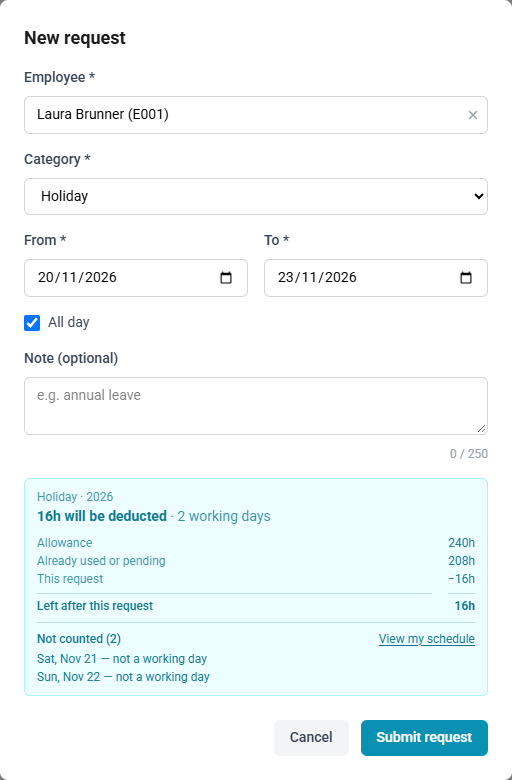
Days that are not counted
| Reason | What it means |
|---|---|
| Not a working day | Your schedule has you off that day. Nothing to do. |
| Holiday | A holiday your schedule does not treat as a working day, or, for a request with a start and end time, a half-day holiday that already frees the time you asked for. |
| Outside your scheduled hours | Only for requests with a start and end time: your schedule that day cannot cover the window you asked for. |
| No working schedule assigned | No schedule covers that date for you at all. |
The first two are shown in a plain panel, because they are ordinary and need nothing from you. The last two are highlighted, because the request will not do what you intended and you may want to change the dates or speak to your administrator.
Half-day holidays
A half-day holiday, such as the afternoon of 24 December from 12:00, frees the part of your working time it covers. A request that includes it counts only the working time left that day, and the preview lists it separately with the hours it counts for.
A request for part of the day counts only the time that is not already free: asking for the afternoon of a date off from 12:00 costs nothing, and the form lists that day as a holiday. See Half-day public holidays.
If the number looks wrong
A total that seems too high or too low is almost always a schedule that covers different days from the ones you expected, and the list of days not counted will show you which.
My Schedule shows the pattern that applies to you — see Seeing your working schedule. It is set by your administrator, so ask them if what it shows is not what you expect.