Login email override
An employee whose email address is not on your company's email domain can still sign in with an address on that domain. This login email is used only to sign in: every email ChronoHub sends goes to the employee's real address.
When it is needed
- Consultants who work for your company under their own firm's domain.
- Employees without a company address, who use a personal address from a public email service.
- Staff of an acquired company who keep addresses on a domain your company does not use for ChronoHub.
- Subsidiaries that use a different domain from the parent company.
If every employee's email address is on your company's domain, leave the field empty.
How to set a login email
- Open Master Data → Employees and select Edit on the employee.
- On the Identity tab, expand Advanced.
- In Login email (override), enter the part before the @. The domain is fixed and shown after the field.
- Select Save.
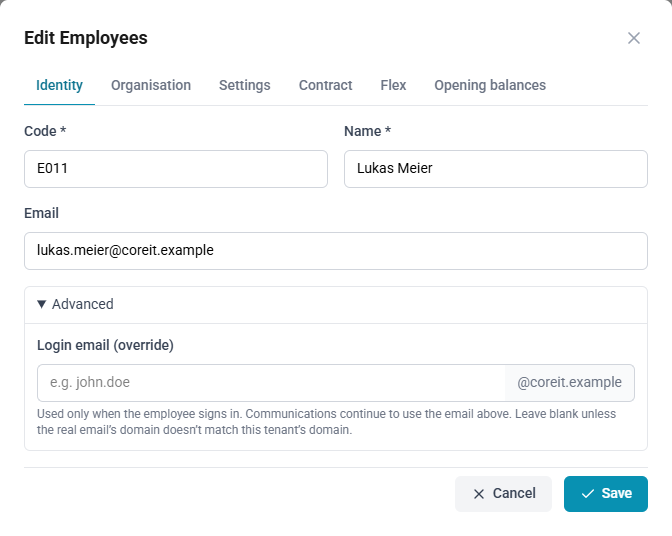
The employee then enters that address on the sign-in page. See Signing in.
What it changes, and what it does not
The login email affects only how the employee signs in.
- Sign-in: the employee enters the login email on the sign-in page. A passkey is found by it too.
- Single sign-on: the identity provider may send either address; both are recognised. See Single sign-on.
- Password reset: the employee can enter either address when requesting a reset. The reset email always goes to the real address.
- Notifications and other emails: always go to the real address.
- Reports, exports and integrations: show the real address.
Rules the form applies
- Only the part before the @ can be entered; the domain is your company's.
- Two employees cannot share a login email, and a login email cannot match another employee's real address.
- Employees who sign in only through single sign-on do not see the field, because they do not sign in with an email address and a password.
- Imported employees can have a login email too. It is kept in ChronoHub and is not taken from the source system.
Your company's domain
The domain is recorded by the ChronoHub team when your workspace is set up, and every workspace has one. To change it, contact your account manager.